AI-Generated Dockerfile Broke Production: Alpine, Temporal, and musl vs glibc
I accepted an AI-suggested Dockerfile without a deep review. Four hours later, Temporal workers failed in production — musl, glibc, and what I missed.
Jonathan Juliani
Sr Software Engineer - Full Stack · WithClutch Inc. | Juliani Tecnologia
Node.jsDockerTemporalAICursorDevOps
Audio in Brazilian Portuguese · YouTube offers automatic captions and translation
You accept a snippet your AI assistant suggested, skim the diff, and ship to production. Four hours later: workers down, dependent services failing, rollback in progress.
The worst part: the AI output was technically correct for the question you asked. The failure came from what it could not know — and what you never told it. This post-mortem is about AI-generated code in production when the default answer hits a native dependency: NestJS, TemporalIO, node:alpine, and the musl-vs-glibc gap your team was not looking at.
"I accepted a code snippet the AI suggested. I did not review it deeply. I shipped to production. Four hours later: workers down, services failing, deploy rolled back."
— Week 2 video hook (mirror of this post)
What you will learn:
Why AI can match best practices and still break your deploy
The prompt I used vs the prompt I should have used
Symptoms, logs, and root cause with @temporalio/core-bridge on Alpine
The dev / CI / production runtime gap
Full Dockerfile diff and Alpine vs Bullseye tradeoffs
A checklist before accepting AI output for infra
NestJS in production: context the AI never had
This only makes sense with the environment where the bug stayed invisible — not a bio paragraph, but the conditions that hid the failure.
We had a mature NestJS backend in production: code review, automated tests, staging before deploy. PostgreSQL, queues, external integrations — a typical long-running service.
Then we added TemporalIO for async workflow orchestration: long-running jobs, retries, processes that do not belong in a fire-and-forget HTTP handler. Normal spike, normal PRs.
Like most teams in 2026, AI was already in the workflow — Cursor, Copilot, Claude — for boilerplate, test drafts, reviews, and Dockerfiles. Work that used to take an hour now takes ten minutes.
You may be there too. AI is part of the pipeline, not a novelty.
There was another piece that combined badly: almost nobody ran the backend in Docker locally. Development was npm run start:dev on a Mac or Linux laptop — glibc, native deps resolving without drama. Docker was for deploy: CI/CD, Kubernetes, production.
Classic reasons: heavy compose, memory, inertia. Fine until the artifact in production is not the runtime you tested for months.
AI in the workflow plus no local container validation was a minefield. We did not see it that way.
What I assumed vs what I learned
What I assumed: Dockerfiles are recipes. AI knows the production default. Green CI plus manual staging means safe to ship. node:alpine is the smart choice — smaller, faster, every tutorial agrees.
What I learned: The default only works when the runtime you test is the runtime you deploy — and when the prompt includes dependencies that change the answer. AI accelerates the known path. In the 10% that is specific to your project, that acceleration becomes a trap if you trust the output without validating the assumption.
This incident follows the error-real arc I use on the channel: situation → conflict → failed attempt → resolution → lesson. The failed attempt matters as much as the fix.
TemporalIO on Node: the prompt I used vs what I should have asked
At some point the service needed its own production image. Repetitive, recipe-driven work — exactly what gets delegated to AI.
I asked something like:
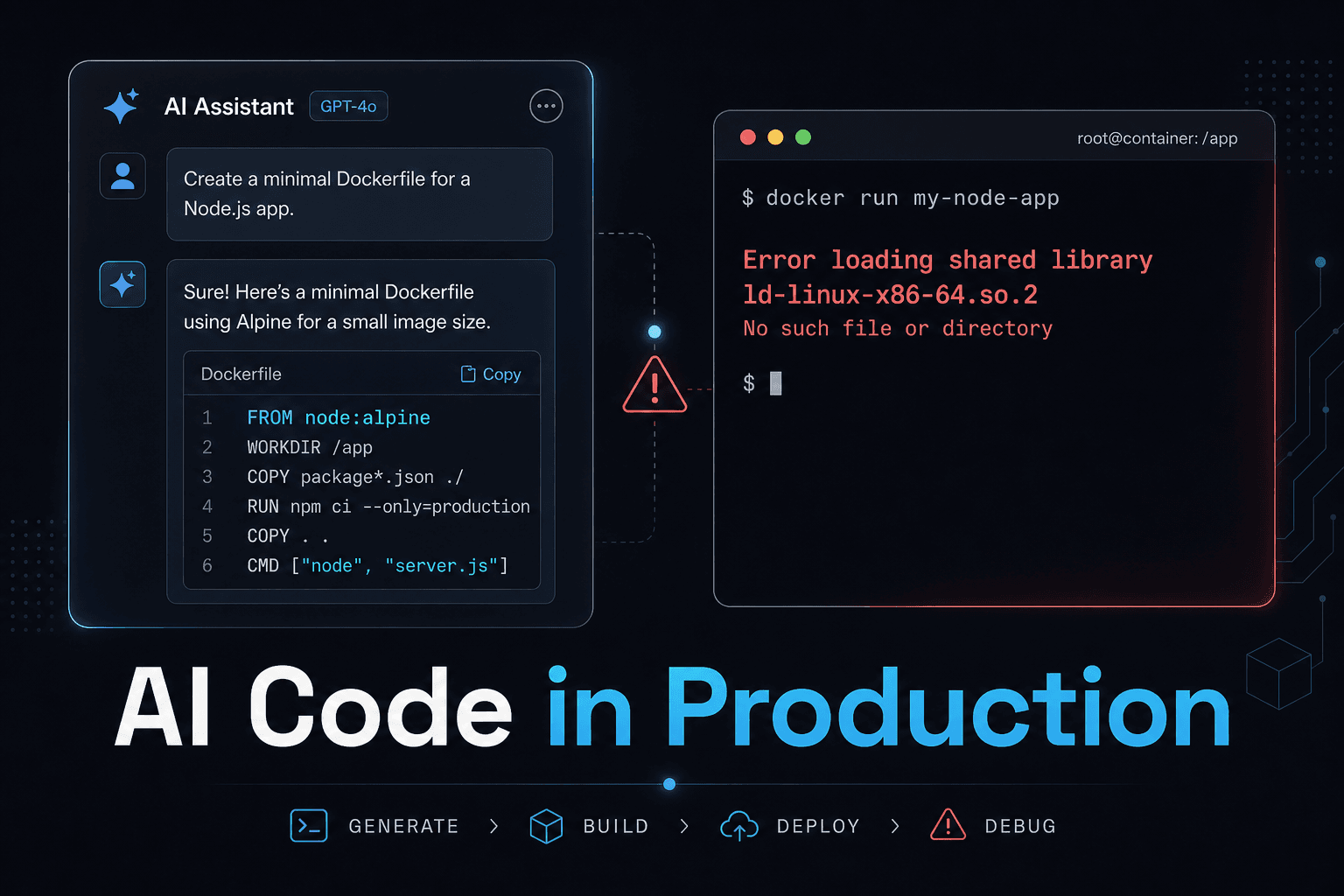
"Help me build a Dockerfile for this Node service in production. Optimized, multistage, small."
The model did what any competent engineer would do for that prompt: node:alpine base, multistage build, dependency cache, non-root user, healthcheck. Clean. Efficient.
I skimmed it, agreed, committed. PR approved — review focused on security and image size. CI green. Staging passed manual checks. Deploy scheduled.
Stop here:
What should I have asked instead?
"Help me build a Dockerfile for this Node service in production. Important: this service uses the TemporalIO SDK, which has native dependencies. Optimized, but compatible."
That context — Temporal plus native deps — only I had. The model answered as well as possible given the prompt.
But doesn't Alpine work for most Node services? Yes. For maybe 90% of services it is fine. Ours was in the other 10%. I knew Temporal shipped native binaries. I just did not say so.
node:alpine in production: symptoms and investigation
Deploy ran. The image matched the AI suggestion:
code
FROM node:22-alpine AS builderWORKDIR /appCOPY package*.json ./RUN npm ciCOPY . .RUN npm run buildFROM node:22-alpine AS runtimeWORKDIR /appCOPY --from=builder /app/node_modules ./node_modulesCOPY --from=builder /app/dist ./distENV NODE_ENV=productionCMD ["node", "dist/main.js"]
The pod came up. Generic health checks passed. Then alerts fired.
Symptoms: container alive, Node crashing while loading @temporalio/core-bridge. Temporal workers never registered. Downstream services failed. Rollback, hours to isolate.
Typical log on linux/amd64:
code
Error: Error loading shared library ld-linux-x86-64.so.2: No such file or directory(needed by /app/node_modules/@temporalio/core-bridge/releases/x86_64-unknown-linux-gnu/index.node)
On arm64 (or Apple Silicon reproduction), wording changes but the pattern is the same — failure loading the .node against the container libc:
code
temporal-worker-1 exited with code 1 (restarting)Error: Error relocating .../aarch64-unknown-linux-gnu/index.node: __register_atfork: symbol not found
In both cases: the dynamic linker cannot resolve the native binary — musl on Alpine vs a binary built for glibc.
The attempt that did not work
First move was rollback — correct. Then the team got stuck on the obvious question: what changed in this deploy? Answer: Temporal integration. New code, new Dockerfile.
What did not fix it: treating it as an application bug. Re-reviewing the TypeScript diff. Re-running CI tests (outside the container). Comparing Node versions in package.json. All green — because nobody was testing the artifact going to the cluster.
The lesson is in the failed attempt: when production runs an image dev never executed, debugging only the source code wastes hours looking in the wrong place.
If it worked in dev and staging, why break only in production? Because on paper the stack matched: same Node, same code. On paper.
The gap was container runtime:
Environment
How it ran
libc
Temporal worker
Local dev
npm run start:dev on host
glibc
OK
CI
tests outside prod image
glibc
OK (image not tested)
Production
node:22-alpine container
musl
Fails loading .node
musl vs glibc: root cause behind the Temporal SDK
node:alpine is small — roughly ~50 MB vs 350+ MB for a full Debian base — because Alpine ships musl libc.
Mainstream Linux (Debian, Ubuntu, RHEL) uses glibc, the default for most prebuilt native artifacts.
Pure JavaScript or compiled TypeScript? The Node runtime hides the difference.
Native addons — node-gyp during install, .node files under node_modules — bind to the host libc.
Our stack pinned @temporalio/worker@1.5.2, which pulls @temporalio/core-bridge with prebuilt *-unknown-linux-gnu targets — glibc. Inside Alpine (musl), the linker cannot resolve dependencies.
If the package compiled from source on Alpine, would it work? Sometimes. Many libraries ship glibc-only binaries or assume glibc at runtime. Temporal 1.5.2 fell in that bucket.
Should the AI have known? Only with the right prompt. For "optimized Node production Dockerfile," node:alpine is the correct default. The model cannot guess which dependency you will add three weeks later.
Version note: Temporal SDK 1.10+ improved Alpine documentation and packaging. The lesson stays: native deps are a platform contract — and version matters.
Dev, CI, and container: why nobody caught it pre-deploy
Locally everyone ran Node on the host — glibc, no surprises.
CI ran unit and integration tests outside the production image. Business logic validated; final artifact not.
Staging exercised manual flows on the dev runtime, not the Alpine image.
Invisible gap. For months.
One local docker build && docker run before merge would have surfaced the error on a laptop instead of in production logs.
node:bullseye vs Alpine: the fix and size tradeoff
Fix: change the base image.
code
# Before — musl, worker failsFROM node:22-alpine AS builder# ...FROM node:22-alpine AS runtime# After — glibc, worker startsFROM node:22-bullseye-slim AS builder# ...FROM node:22-bullseye-slim AS runtime
Multistage layout, layer cache, non-root user — still valid. The AI did not fail the pattern — I failed to correct the assumption.
Four principles for using AI code without the trap
The important part is not the one-line base image change:
What if the problem was not Alpine — but how I asked?
It was.
1. AI does not know your stack
Models excel at patterns: "Node production Dockerfile," "Express REST API," "React hook component." Millions of examples.
They do not know your project: installed libs, Node version constraints, native SDKs, whether CI tests the real image, Alpine vs Debian in prod.
That context is yours. Without it, you get the default — fine for 90% of cases, wrong for the rest.
2. Reviewing AI code means reviewing twice
Human review: does it make sense? any bugs?
AI review adds: what did it not see?
Questions I run before accepting non-trivial AI output:
What context did I omit? Would the answer change if I added it?
What did it assume as default? Base image, library version, runtime.
Does this cross an infra boundary? Build, deploy, external APIs — if yes, double the scrutiny.
This is not anti-AI skepticism. It is remembering the model only knows what you gave it.
3. Alpine is not free
Pure infra — AI-agnostic. Alpine is good in the right context. The tradeoff tutorials — human or AI — rarely spell out: musl vs glibc.
Pure Node? Alpine is fine. With native deps — node-gyp, .node files, SDK bindings — verify musl compatibility first.
Base image
Approx. size
libc
Native deps (e.g. Temporal 1.5.x)
node:22-alpine
~50 MB
musl
High risk if binary targets glibc
node:22-bullseye-slim
~150 MB
glibc
Compatible in most cases
node:22-bookworm-slim
~160 MB
glibc
Same profile, newer Debian
node:bullseye-slim or node:bookworm-slim deliver a lean image with glibc. A decent middle ground.
4. Native deps are a platform contract (and AI does not see it)
Every native dependency is an implicit contract with the runtime platform. When AI suggests a Dockerfile, it does not see that contract — it sees your prompt, patterns, defaults.
Checklist before merging any Dockerfile — AI or hand-written:
You do not need to memorize this per PR. Put it in CI or CONTRIBUTING.md. Make it flow, not memory. Three questions. Two minutes. Would have saved hours of incident time.
Reproduce the bug in two commands
I published a minimal repo: NestJS + Temporal SDK 1.5.2 + broken Alpine Dockerfile + fixed Bullseye variant.
The README is a full technical post-mortem — useful for demos or team walkthroughs.
Checklist: ten minutes that would have saved four hours
Before accepting AI output for Dockerfile, compose, or pipeline:
Did I pass all native deps and runtime constraints in the prompt?
Did I review what the model assumed (base image, version, libc)?
Does the diff cross infra / build / deploy boundaries?
Any .node, node-gyp, or binding SDK on the path?
Does CI build and test inside the production image?
Did I run the container locally at least once?
That checklist is the core of this week's newsletter — "ten minutes that would have saved four hours": the post-mortem in detail plus what I would have asked the AI before accepting the code. Subscribe at /en-US/newsletter.
What I still do not know
I do not have closed answers for everything — worth stating explicitly:
Whether the same incident would happen with Temporal SDK 1.10+ on Alpine today — docs improved, but native deps remain a platform contract.
The minimum CI cost to validate the real image without blocking the team — still calibrating this on projects I touch.
Whether feature flags would have masked the problem longer (spoiler: probably yes — and that would be worse).
If you tested Alpine with recent native deps and got a different result, comment — that improves the post.
What stuck was not downtime alone. I delegated an infra decision to AI without sharing context only I had. The model did not fail — it answered what a competent engineer would give to the question I asked.
The mistake was mine in three layers: I did not pass context, I did not review what the model could not see, and I did not run the container locally before merge.
If AI gave you clean-looking code that burned you in production — which tool (Cursor, Copilot, Claude?), what broke — share in the comments. Got a better checklist? Drop it below. Happy to update how I work from real war stories.
For the weekly checklist and production signals by email, join the newsletter.
Subscribe to the Engineering Ledger
Get architecture and performance notes in your inbox. Same list as the timed prompt—subscribe here anytime.