JavaScript Promises and async/await from the ground up: states, chaining, error handling, and the gotchas official docs tend to skip.
Jonathan Juliani
Sr Software Engineer - Full Stack · WithClutch Inc. | Juliani Tecnologia
JavaScript
You write a function that fetches data from an API, log the result to the console — and get undefined. The code looks right. The URL is correct. The value just never arrived in time. Let's fix that for good.
Promises in JavaScript are the mechanism that lets you work with asynchronous operations without turning your code into a pyramid of callbacks. Understanding how they actually work — not just the syntax, but the states and the silent errors — is what separates developers who use async/await from those who understand what's happening underneath.
What you'll learn:
What a Promise is and its three possible states
How to use .then(), .catch(), and .finally() in a chain
How async/await is just syntactic sugar over Promises
When to use Promise.all, Promise.race, and Promise.allSettled
for await...of — what it is and where it actually fits
The gotchas official docs tend to gloss over
Prerequisites: functions, arrays, objects, and basic JavaScript. If you want to understand how Node organizes modules before mixing fetch and require together, Node.js: require, exports, and module.exports explained is a good starting point.
Subscribe to the Engineering Ledger
Get architecture and performance notes in your inbox. Same list as the timed prompt—subscribe here anytime.
JavaScript runs on a single thread. When you make a network request, read a file, or query a database, the JS engine can't simply pause and wait — that would freeze everything. The historical solution was callbacks: you pass a function to be called when the result arrives.
The problem shows up when you need several results in sequence:
code
fetchUser(id, function(err, user) { if (err) return console.error(err); fetchOrders(user.id, function(err, orders) { if (err) return console.error(err); fetchProduct(orders[0].productId, function(err, product) { if (err) return console.error(err); // finally here console.log(product.name); }); });});
This has a name: callback hell. The code grows rightward, error handling repeats at every level, and any refactoring turns into a nightmare. Promises were ES6's answer.
Promise: the object and its three states
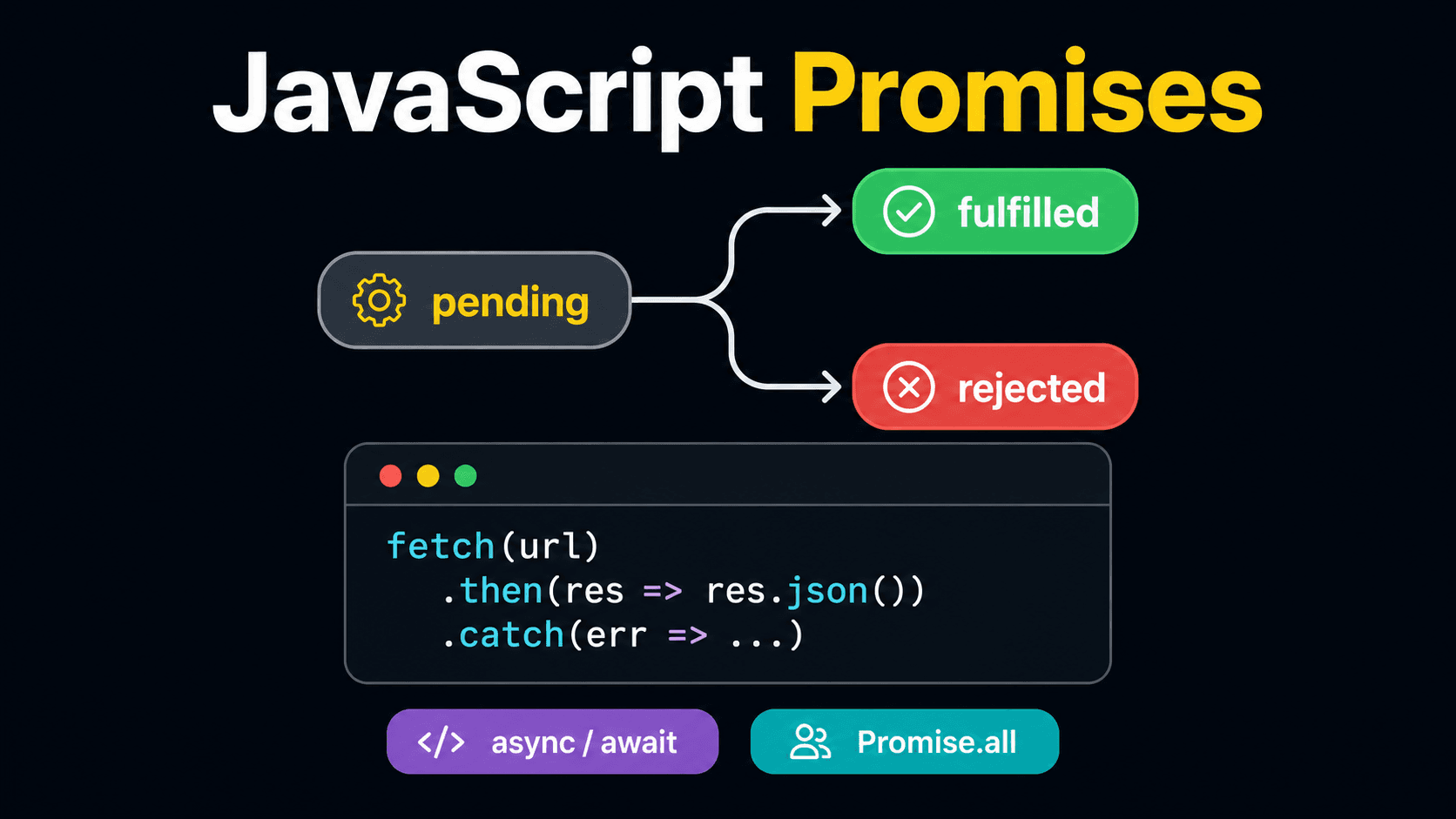
A Promise represents a value that may not be available yet. It's always in one of three states:
pending — operation in progress, result hasn't arrived yet
fulfilled — operation completed successfully, value is available
rejected — operation failed, reason for failure is available
A fulfilled or rejected state is final — a Promise doesn't go back to pending and doesn't switch from fulfilled to rejected.
[IMAGE: flowchart showing the three Promise states — pending in the center, arrow to fulfilled on the right and arrow to rejected on the left, labeled resolve() and reject() | alt: "JavaScript Promise lifecycle: pending, fulfilled, and rejected states"]
You create a Promise like this:
code
const promise = new Promise((resolve, reject) => { const succeeded = true; // simulates an operation result if (succeeded) { resolve('operation complete'); // moves to fulfilled } else { reject(new Error('something went wrong')); // moves to rejected }});
The constructor takes an executor function with two parameters: resolve (call it when things went well, with the value) and reject (call it when things failed, typically with an Error).
In practice you rarely create Promises from scratch like this — you use APIs that already return Promises, like fetch, fs.promises.readFile, or any modern library. But understanding the constructor is what makes everything else click.
.then(), .catch(), and .finally(): chaining without losing the thread
.then() takes a function that will be called when the Promise is fulfilled, with the resolved value as argument:
code
fetch('https://api.example.com/user/1')
  .then(response => response.json()) // transforms Response into an object
  .then(user => console.log(user.name)); // uses the result
Notice the chaining: .then() returns a new Promise. Whatever you return inside the callback becomes the value of the next Promise in the chain. That's what lets you chain without nesting.
.catch() captures any rejection that happened anywhere in the chain above it:
If a Promise is rejected and there's no error handler anywhere in the chain, you'll get an UnhandledPromiseRejection — which in Node.js terminates the process by default since version 15. In the browser, it becomes a console error that can go unnoticed. Always handle the error.
async/await: Promise with synchronous-looking code
async/await is syntactic sugar over Promises — not a different mechanism. An async function always returns a Promise, even when you return a plain value:
code
async function greeting() { return 'hi'; // equivalent to Promise.resolve('hi')}greeting().then(console.log); // 'hi'
await pauses execution of the async function until the Promise resolves, and extracts the value:
code
async function fetchUser(id) { const response = await fetch(`https://api.example.com/user/${id}`); const user = await response.json(); return user;}
Much more readable than chaining .then(). Same Promise underneath.
Error handling with async/await is done with try/catch:
code
async function fetchUser(id) { try { const response = await fetch(`https://api.example.com/user/${id}`); if (!response.ok) { throw new Error(`HTTP ${response.status}`); // throw manually to land in catch } return await response.json(); } catch (err) { console.error('failed to fetch user:', err.message); throw err; // re-throw so callers can handle it too }}
What if I use await outside an async function?
Syntax error. await only works inside async. Exception: at the root level of ES modules (type: "module" in package.json or .mjs files) you can use top-level await — but not in traditional CommonJS.
One thing that trips people up: await inside .map() doesn't do what it looks like:
code
// WRONG — map doesn't wait for Promises to resolveconst results = ids.map(async (id) => await fetchUser(id));// results is an array of Promises, not of users// CORRECT — waits for allconst results = await Promise.all(ids.map(id => fetchUser(id)));
Multiple operations: Promise.all, race, and allSettled
When you need several asynchronous operations, you have three main tools.
Promise.all — all or nothing
Takes an array of Promises and returns a Promise that resolves with an array of results — but rejects if any one of them rejects:
Much more efficient than two sequential calls — both requests run in parallel.
Promise.race — first one wins
Resolves or rejects with the result of the first Promise to complete:
code
const result = await Promise.race([ fetchData(), new Promise((_, reject) => setTimeout(() => reject(new Error('timeout')), 5000) ),]);
Useful for implementing timeouts: if fetchData takes more than 5 seconds, the timeout Promise rejects first.
Promise.allSettled — waits for all, no short-circuit
Unlike Promise.all, it doesn't reject if one fails. Waits for all to finish and returns an array describing each result:
code
const results = await Promise.allSettled([ fetchUser(1), fetchUser(99999), // this one will fail fetchUser(3),]);results.forEach(result => { if (result.status === 'fulfilled') { console.log('ok:', result.value.name); } else { console.error('failed:', result.reason.message); }});
Use allSettled when partial failure is acceptable — like loading multiple widgets on a dashboard.
Method
On failure
When to use
Promise.all
Rejects on first failure
All responses are required
Promise.race
Resolves/rejects with the first
Timeout, cache vs. network
Promise.allSettled
Waits for all, reports each
Partial failure is acceptable
for await...of and what the docs don't tell you
for await...of is from ES2018 and lets you iterate over async iterables — streams, async generators, anything that returns Promises in sequence:
code
async function processLines(stream) { for await (const line of stream) { await processLine(line); // waits for each one before continuing }}
It's different from Promise.all: for await...of processes sequentially, one at a time. Promise.all processes in parallel. The choice depends on whether order matters or one result depends on the previous.
Gotcha: UnhandledPromiseRejection
[IMAGE: terminal screenshot showing "UnhandledPromiseRejectionWarning" in Node.js | alt: "UnhandledPromiseRejection error in Node.js when a Promise is rejected without a handler"]
This error appears when you create or chain a Promise, it rejects, and there's no .catch() or try/catch to capture it. Very common in loops:
code
// WRONG — none of the Promises have error handlingids.forEach(id => { fetchUser(id); // fires but doesn't await, doesn't handle errors});// CORRECTawait Promise.all( ids.map(async (id) => { try { return await fetchUser(id); } catch (err) { console.error(`failed on id ${id}:`, err.message); return null; } }));
What if I want to fire a Promise without waiting for the result — fire-and-forget?
You can, but add at least an empty .catch() to avoid UnhandledPromiseRejection:
code
logEvent(data).catch(() => {}); // fires without awaiting, intentionally ignores the error
Only do this if you genuinely don't care about the result. In production, at least log the error.
Quick reference
Concept
What to remember
Promise
Represents a future value. States: pending → fulfilled or rejected
.then()
Receives the resolved value; returns new Promise
.catch()
Captures any rejection in the chain above
.finally()
Always runs; receives no value, doesn't alter result
async
Makes the function return a Promise automatically
await
Pauses the async function until the Promise resolves; extracts the value
[PREENCHER: add personal CTA here — something like "How do you handle error handling in async calls in production? Got a pattern you discovered in practice that I didn't cover here? Drop it in the comments — and if you spotted a mistake, feel free to correct it :D"]