jonathanjuliani
Implementing Tries with NodeJS and Javascript
Tries in JavaScript: insert, search, startsWith, and autocomplete in practice. Prefix trees with clear Node.js examples.

Autocomplete on every keystroke does not scan the whole dictionary — it matches prefixes. A trie shares nodes between words with the same start.
What you'll learn:
- character nodes and end-of-word flags
- insert, search, startsWith
- memory vs hash table for large vocabularies
- IDE search, routing tables
Prerequisites: BST (ep. 12).
Trie: prefix tree in JavaScript
Ever wonder how your IDE suggests completions while you type, or how a search engine shows suggestions before you finish your sentence? A big part of the answer is the Trie (pronounced "try", short for retrieval).
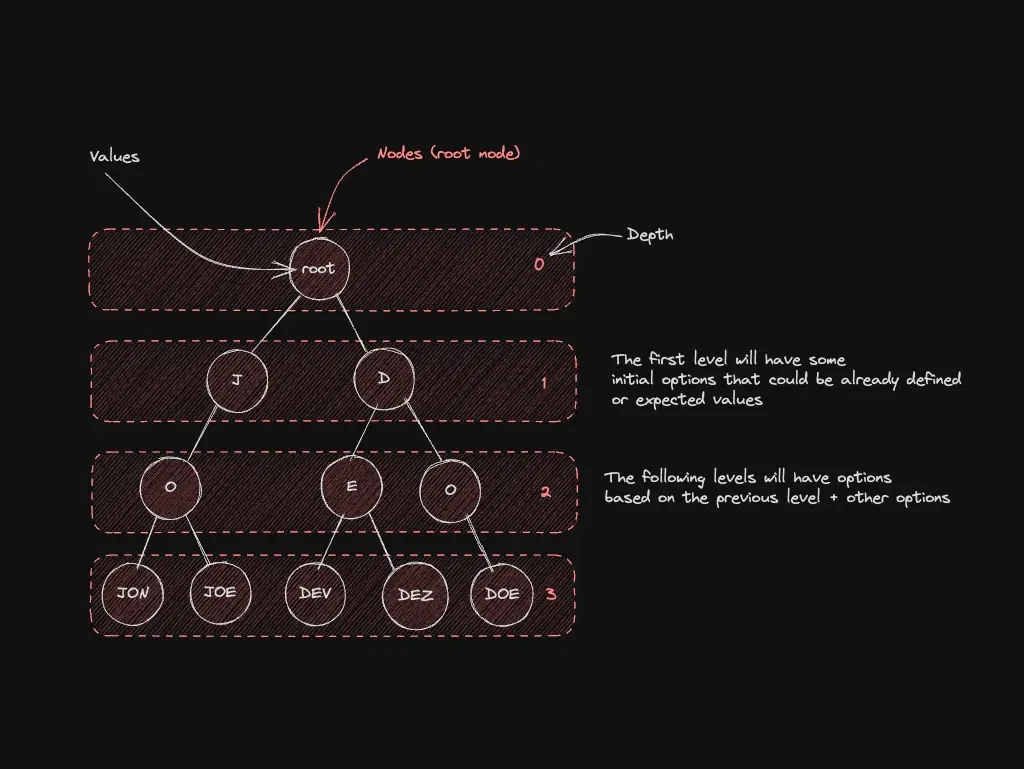
A Trie is a tree where each node represents a single character. You read a word by following a path from the root to a leaf. Nodes that are shared between words represent common prefixes—and that's what makes the structure so powerful for prefix lookups.
scene: en/data-structures-in-a-nutshell/trie-can-car-cat-bat
Interactive Excalidraw view is not available in this build.
graph LR root((root)) c((c)) b((b)) a1((a)) a2((a)) n((n)) r((r)) t((t)) end_can(["✓ can"]) end_car(["✓ car"]) end_cat(["✓ cat"]) end_bat(["✓ bat"]) root --> c root --> b c --> a1 a1 --> n --> end_can a1 --> r --> end_car a1 --> t --> end_cat b --> a2 a2 --> end_bat
Look at the diagram above. The words can, car, and cat all share the prefix ca—so they share the same c → a path from the root. You store the prefix once and branch only at the point where words diverge. Efficient.
Hands-on
First The Theory
Tries trade memory for speed. For a dictionary of strings, a hash map gives you O(1) exact lookup. But for prefix search ("give me all words starting with ca"), a hash map has no shortcut—you scan everything. A Trie gives you that in O(k) where k is the length of the prefix.
Each node in a Trie is essentially a map of characters to child nodes, plus a flag that marks whether a complete word ends here.
Now The Practice
Open your IDE, create a file called trie.js, and paste this:
class TrieNode {
constructor() {
this.children = {}
this.isEndOfWord = false
}
}
class Trie {
constructor() {
this.root = new TrieNode()
}
insert(word) {
let node = this.root
for (const char of word) {
if (!node.children[char]) {
node.children[char] = new TrieNode()
}
node = node.children[char]
}
node.isEndOfWord = true
}
}Breaking it down:
TrieNodeholds achildrenmap (character → child node) and anisEndOfWordflag.Triestarts with an emptyrootnode.insertwalks character by character. If a node for the current character doesn't exist yet, it creates one. At the end of the word it setsisEndOfWord = true.
Now let's add search and startsWith:
search(word) {
let node = this.root
for (const char of word) {
if (!node.children[char]) return false
node = node.children[char]
}
return node.isEndOfWord
}
startsWith(prefix) {
let node = this.root
for (const char of prefix) {
if (!node.children[char]) return false
node = node.children[char]
}
return true
}The difference between the two:
searchreturnstrueonly if the exact word was inserted (checksisEndOfWord).startsWithreturnstrueif any inserted word starts with the given prefix (doesn't care aboutisEndOfWord).
Let's also add a helper that returns all words with a given prefix—this is essentially an autocomplete function:
autocomplete(prefix) {
let node = this.root
for (const char of prefix) {
if (!node.children[char]) return []
node = node.children[char]
}
const results = []
this._collectWords(node, prefix, results)
return results
}
_collectWords(node, current, results) {
if (node.isEndOfWord) results.push(current)
for (const char of Object.keys(node.children)) {
this._collectWords(node.children[char], current + char, results)
}
}Now let's test everything. After the Trie class, paste:
const trie = new Trie()
trie.insert('can')
trie.insert('car')
trie.insert('cat')
trie.insert('bat')
trie.insert('ball')
trie.insert('band')
console.log('search("can"):', trie.search('can')) // true
console.log('search("ca"):', trie.search('ca')) // false (not a complete word)
console.log('search("dog"):', trie.search('dog')) // false
console.log('\nstartsWith("ca"):', trie.startsWith('ca')) // true
console.log('startsWith("ba"):', trie.startsWith('ba')) // true
console.log('startsWith("xy"):', trie.startsWith('xy')) // false
console.log('\nautocomplete("ca"):', trie.autocomplete('ca'))
console.log('autocomplete("ba"):', trie.autocomplete('ba'))Run it:
node trie.jsExpected output:
search("can"): true
search("ca"): false
search("dog"): false
startsWith("ca"): true
startsWith("ba"): true
startsWith("xy"): false
autocomplete("ca"): [ 'can', 'car', 'cat' ]
autocomplete("ba"): [ 'bat', 'ball', 'band' ]AWESOME!
autocomplete("ca") returned ['can', 'car', 'cat']—exactly the words we inserted that start with "ca". That's the Trie doing its thing: instead of scanning all 6 words, it jumped straight to the c → a path and collected only what lived there.
What if I want results sorted alphabetically?
The _collectWords helper iterates Object.keys(node.children), and in V8 (Node.js) string keys are iterated in insertion order. If you want alphabetical order, sort the keys: for (const char of Object.keys(node.children).sort()). One line change.
Edge cases: use Object.create(null)
Plain {} children inherit toString / constructor — a key "toString" breaks traversal. Object.create(null) avoids prototype pollution.
Sparse tries waste memory — radix trees compress single-child chains (advanced topic).
TL;DR — Trie
| op | O(word length) |
|---|---|
| insert/search | O(m) |
Next steps
Before you go
Built prefix search or autocomplete? Share the gotcha that hurt.
Subscribe to the Engineering Ledger
Get architecture and performance notes in your inbox. Same list as the timed prompt—subscribe here anytime.
Related articles

Data Structures and Algorithms - A Summary of The Most Used Ones
Practical overview of the data structures and algorithms you use most in JavaScript/Node.js — with examples and links to go deeper.
Read story
Implementing Arrays with NodeJS and Javascript
JavaScript arrays in Node.js: essential methods, immutability patterns, and when an array beats other structures. Hands-on guide.
Read story