Spread and Rest in JavaScript: arrays, objects, and the shallow copy gotchas
Spread operator and rest in JavaScript: how they work in arrays, objects, and functions, and the shallow copy gotchas that catch every developer.
Jonathan Juliani
Sr Software Engineer - Full Stack · WithClutch Inc. | Juliani Tecnologia
JavaScript
You do const copy = [...original], modify the copy, and the original array changes with it. Or you clone an object with spread and discover a nested property is still a shared reference. Spread looks simpler than it is — and the bugs it hides are the hardest to debug because they throw no exception.
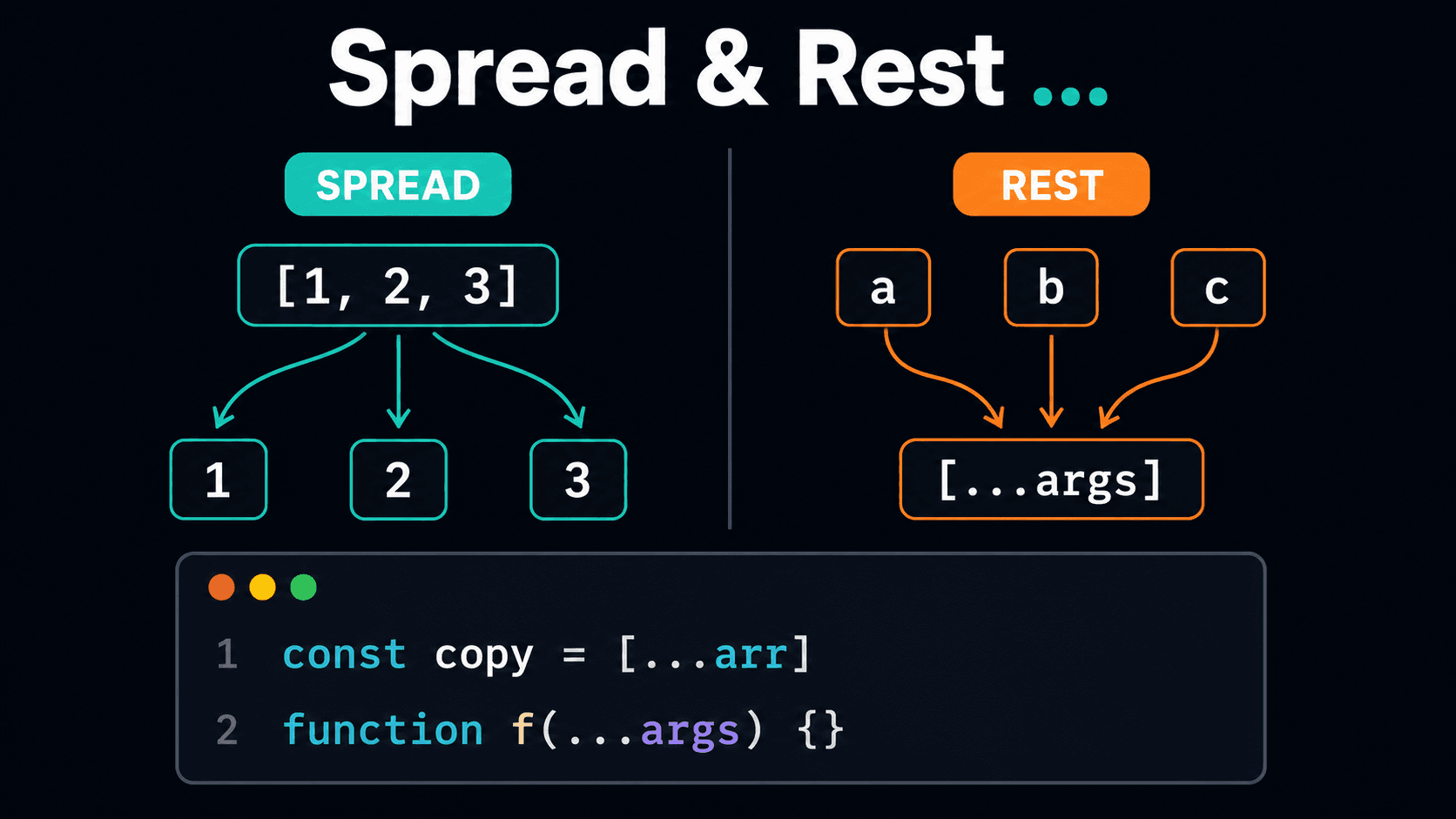
Spread and rest use the same syntax (...) for opposite purposes: spread expands an iterable into its elements, rest collects separate elements into an array. Understanding when each one kicks in — and where shallow copy gets you — is what this post covers.
What you'll learn:
Spread in arrays: clone, combine, and spread as function arguments
Spread in objects: replacing Object.assign for good
const result = Object.assign(defaults, preferences);// defaults was mutated — result and defaults are the same object
With spread, you always get a new object. The accidental mutation of Object.assign is why object spread became the standard. If you want to use Object.assign without mutating, you pass an empty object as the first argument: Object.assign({}, a, b) — but at that point, spread is more readable.
Rest parameters: spread in reverse
Rest parameters collect the remaining arguments of a function call into a single array. It's ... on the receiving side, not the calling side:
code
function sum(...numbers) { return numbers.reduce((total, n) => total + n, 0);}sum(1, 2, 3); // 6sum(10, 20, 30, 40); // 100
You can combine regular parameters with rest — but rest must come last:
code
function log(level, ...messages) { // level is the first argument // messages is an array with the rest messages.forEach(msg => console.log(`[${level}]`, msg));}log('INFO', 'server started', 'port 3000');// [INFO] server started// [INFO] port 3000
The difference between rest and the arguments object:
code
function withArguments() { console.log(arguments); // Arguments object — not a real array console.log([...arguments]); // array, but a workaround}function withRest(...args) { console.log(args); // real array — has .map, .filter, everything}
arguments doesn't exist in arrow functions, isn't a real array, and doesn't work with destructuring. Rest parameters solves all of that.
When do I use rest vs. spread?
Easy way to remember: rest is in the function definition (collecting what arrives), spread is at the call site (expanding what you send). They're inverse operations:
code
// rest — in the signaturefunction join(...parts) { return parts.join('-'); }// spread — at the callconst words = ['let', 'us', 'go'];join(...words); // 'let-us-go'
Gotchas: shallow copy, nested objects, and spread on strings
Shallow copy
Spread only copies the first level. If the array or object contains references — other objects, nested arrays — those references are shared, not cloned:
[IMAGE: diagram showing two objects with spread — primitive properties are copied by value, but object properties point to the same reference in memory | alt: "Shallow copy diagram with JavaScript spread: primitive values copied, nested objects share reference"]
[IMAGE: browser console screenshot showing original.address.city as 'LA' after mutation via copy | alt: "Browser console showing that nested object spread shares reference — original is mutated when modifying the copy"]
The same happens with arrays of objects:
code
const users = [{ name: 'Ana' }, { name: 'Bia' }];const copy = [...users];copy[0].name = 'Carlos';console.log(users[0].name); // 'Carlos' — the object inside is still a shared reference
So is spread useless for real copying?
No — spread is perfect for flat structures, which covers most cases. The problem is using spread expecting a deep copy when the structure has nesting.
When you need a deep copy, there are two main options:
structuredClone (modern, Node.js 17+ and modern browsers) — the correct way:
code
const copy = structuredClone(original); // real deep clone, no hacks
JSON.parse(JSON.stringify(...)) (works in more environments, but has limitations):
code
const copy = JSON.parse(JSON.stringify(original));// loses: undefined, functions, Date becomes string, Set/Map become {}
Use structuredClone if the environment supports it. Only fall back to JSON.parse/stringify if you need broader compatibility and know the limitations.
Spread on strings
A useful one: spread works on any iterable, including strings:
code
const letters = [...'hello']; // ['h', 'e', 'l', 'l', 'o']// useful for converting a string into an array of charactersconst chars = [...'JavaScript'];// ['J', 'a', 'v', 'a', 'S', 'c', 'r', 'i', 'p', 't']
Unlike split(''), spread handles multi-byte Unicode characters correctly (emojis, characters from languages like Arabic and Japanese):
code
'😀🎉'.split(''); // ['', '', '', ''] — breaks the bytes, not the emojis[...'😀🎉']; // ['😀', '🎉'] — correct
Quick reference
Use
Syntax
Result
Clone array
[...arr]
New array, first level copied
Combine arrays
[...a, ...b]
New array with elements from both
Spread into function
fn(...arr)
Passes each element as argument
Clone object
{...obj}
New object, first level copied
Merge objects
{...a, ...b}
Last one wins on duplicate key
Rest parameters
function f(...args)
args is array of arguments
Deep copy
structuredClone(obj)
Real deep clone
Spread on string
[...'text']
Array of characters (Unicode correct)
Primitives
always copied by value
Modification to copy doesn't affect original
Nested objects
copied by reference
Modification affects original — use structuredClone
[PREENCHER: add personal CTA here — something like "Which spread gotcha bit you in production? The shallow copy one gets everyone at least once. Drop it in the comments — and if you spotted something wrong here, feel free to correct it :D"]