EcmaScript (Javascript and NodeJS) - What's New from ES7 to ES10
JavaScript ES7–ES10 highlights: includes, object spread, flat, fromEntries, and real-world gotchas. Practical guide with code.
Jonathan Juliani
Sr Software Engineer - Full Stack · WithClutch Inc. | Juliani Tecnologia
Node.jsJavaScript
ES7 to ES10: the features you use every day without knowing where they came from
If you use JS day to day, you've almost certainly used includes(), object spread, and flat()—but do you know which ES version each came from? Probably not. Most developers don't.
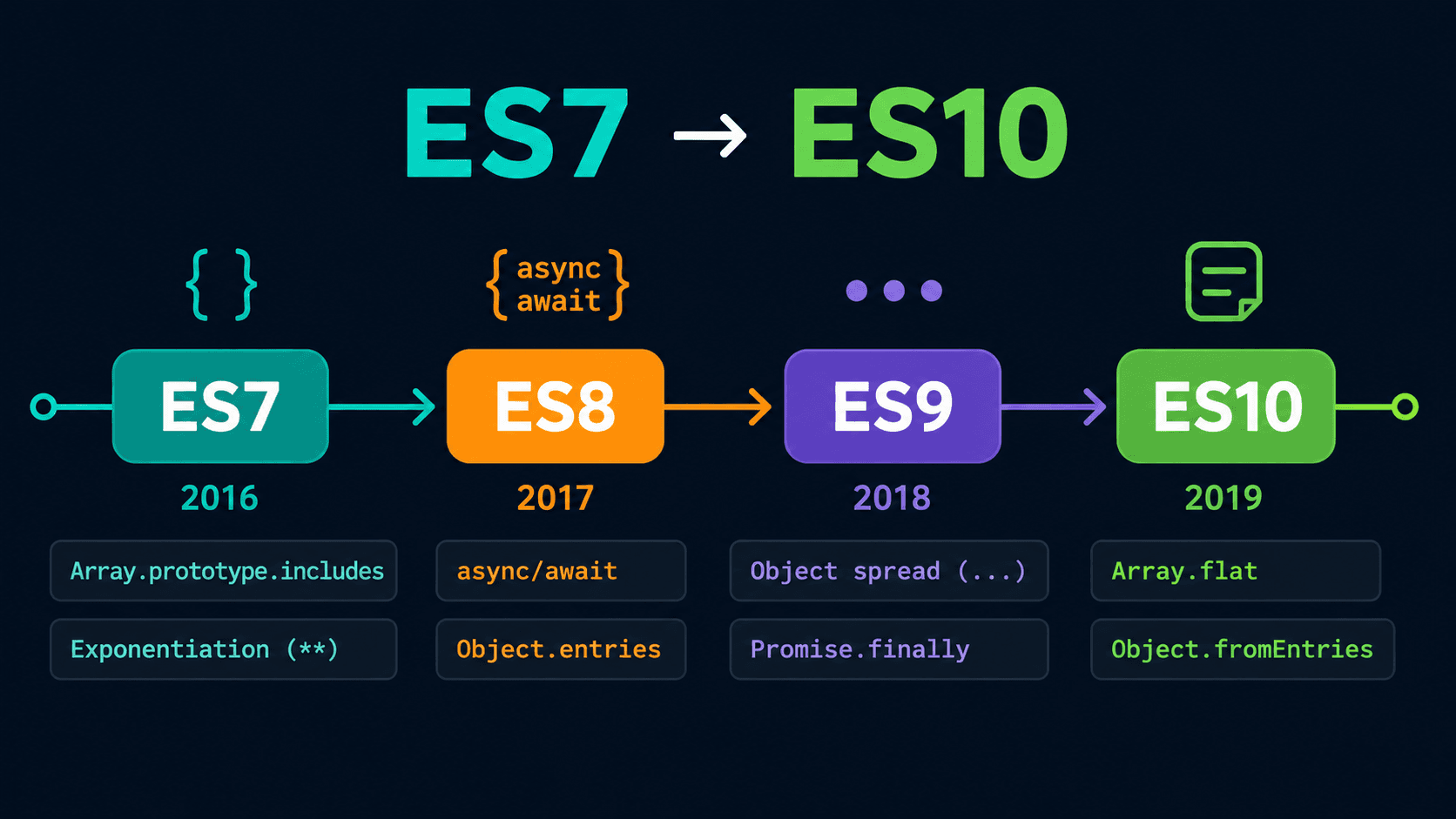
ES7 through ES10 landed some of the most practical additions to the language, and knowing where they came from helps you understand their limitations.
This isn't an exhaustive list of every spec change. The goal is the features you'll actually hit in day-to-day work—with the edge cases the docs tend to skip over.
What you'll learn:
Array.includes() and String.includes() — and the gotcha with objects that trips everyone up
Object.values() and Object.entries() — and their ES10 sibling that reverses them
Object spread operator — why it replaced Object.assign for good
Promise.finally() and for await...of — where each one fits
flat(), flatMap(), , , and optional catch binding
Subscribe to the Engineering Ledger
Get architecture and performance notes in your inbox. Same list as the timed prompt—subscribe here anytime.
includes works great until we start dealing with objects inside arrays.
But it makes sense if you think about it: includes does a simple equality check, and comparing objects requires deeper logic (checking each key and value). We'd need a different approach for that—topic for another post.
Now the exponentiation operator, also very simple:
Here are the main features from ES8 that you might have already used without realising they came from this release:
String padding with padStart and padEnd
Object.values
Object.entries
padStart and padEnd
padStart and padEnd add padding to the beginning or end of a string:
code
const name = 'Jonathan'console.log(name.padStart(10))// Jonathan // <= 10-character padding at the startconsole.log(name.padEnd(10))// Jonathan // <= 10-character padding at the end
Object.values
Object.values returns all the values of an object's keys as an array:
With both of these methods, you can easily convert an object into something you can iterate over—then throw a for, map, reduce, or whatever you need at it.
Top-tier utilities. If you have a cool real-world example using these, drop it in the comments.
ES9: spread in objects, finally, for await
A few highlights from ES9:
Spread operator on objects
finally
for await
Spread in objects: replacing Object.assign
Spread already worked well with arrays, but with objects it wasn't great until ES9. Now we can destructure an object—pull out what we want and throw the rest into a ...rest variable:
code
// object spread operatorconst obj = { id: 1, name: 'Jonathan', bio: 'Fullstack developer — lorem ipsum I got tired of writing',}const { id, ...rest } = objconsole.log(id)// 1console.log(rest)// {// name: 'Jonathan',// bio: 'Fullstack developer — lorem ipsum I got tired of writing'// }
We can also create a shallow copy of an object using spread, without needing Object.assign:
code
const obj2 = { ...obj }console.log(obj2)// { id: 1,// name: 'Jonathan',// bio: 'Fullstack developer — lorem ipsum I got tired of writing' }
And the position of the key doesn't matter—you can extract any key from anywhere in the object, and the rest lands in ...rest:
code
const { name, ...restOfObj } = objconsole.log(name)// Jonathanconsole.log(restOfObj)// { id: 1,// bio: 'Fullstack developer — lorem ipsum I got tired of writing' }
finally: the block that always runs
If you've worked in other languages, you've probably seen finally. It took a while, but it's here in JavaScript now. You can use it in try/catch blocks and promise chains.
In the example below, I fetch from a basic API and use finally to log a string—notice that finally executes even before the fetch completes:
code
const url = 'https://jsonplaceholder.typicode.com/users'const fetchUsers = async () => { const data = await fetch(url) .then((data) => console.log(data)) .catch((err) => console.log('Oops, something went wrong...')) .finally(console.log('No matter what happens, I run.'))}fetchUsers()
for await...of: iterating promises in sequence
This one is a bit trickier to get at first.
The idea: you need to await multiple async operations in a loop. You could do Promise.all(fetch(url1), fetch(url2), ...), or you could write out 10 await statements one by one (please don't), or you use for await:
code
// 3 URLs:const urls = [ 'https://jsonplaceholder.typicode.com/users', 'https://jsonplaceholder.typicode.com/posts', 'https://jsonplaceholder.typicode.com/albums',]// fetching all 3 using for awaitconst fetchData = async (urls) => { const fetchArray = urls.map((url) => fetch(url)) for await (const result of fetchArray) { const data = await result.json() console.log(data) }}fetchData(urls)
Quick note: some features like flat() don't work in older online repls, so test this one in your browser console (as long as it's not from 1997).
flat() is a new method on the Array prototype. It takes nested arrays (arrays inside arrays) and "flattens" them into the parent array. Simple example:
In the example above: for each item we return [item, item * 2]. Normally this would give us an array of arrays—but flatMap flattens that one level, giving us a single flat array. I'll leave you to play around with this one.
Object.fromEntries: the entries() companion
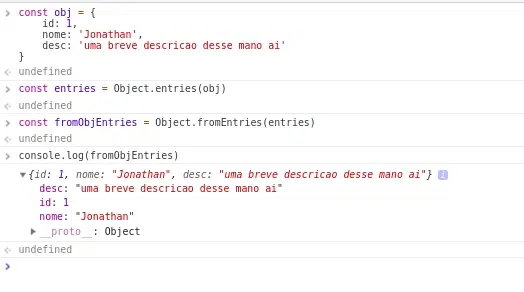
Remember Object.entries() which gives you all key/value pairs as an array? Object.fromEntries() does the exact opposite—it takes an array of [key, value] pairs and turns them back into an object:
Nice, right? This is super useful when a backend or database returns data as arrays of pairs and you want to convert them into a proper object to work with.
trimStart and trimEnd
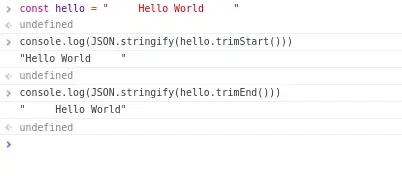
According to the ECMAScript spec, trimStart and trimEnd are better-named alternatives to the existing trimLeft and trimRight. Same function—strip whitespace from the start or end of a string:
Note: I used JSON.stringify() in the console.log to make the spaces visible at the start and end of the string. You don't need any JSON utilities in your actual code.
catch without a parameter
Admit it: you've written console.log(err) inside a catch just to stop the linter from complaining about an unused variable.
We've all been there. But now you can skip the parameter entirely:
code
try { // something risky} catch { // handle the error without declaring `err`}
Clean.
sort() is always stable now: why it matters
I won't go deep into sorting algorithm theory here, but a quick concept you need:
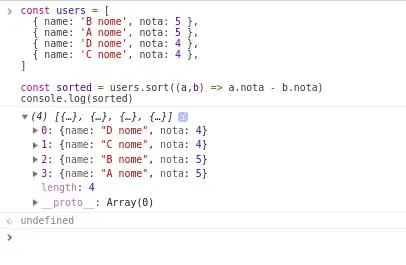
A stable sort preserves the relative order of elements that are considered equal. An unstable sort may swap equal elements around.
In the image: in an unstable sort, A and B (equal in value) might swap positions—same with D and C. In a stable sort, they stay in the original order.
From ES10 onward, Array.sort() is required to be stable by the spec. If you had bugs related to unstable sort behaviour before—no more worrying.
Want to know more about stable vs unstable sorts? Drop it in the comments.
TL;DR — ES7 to ES10 quick reference
Feature
Version
What it does
Gotcha
Array.includes()
ES7
Check if value exists — returns boolean
Reference comparison: doesn't work with objects
String.includes()
ES7
Check if substring exists
Case-sensitive
** (exponentiation)
ES7
Raises to a power
—
padStart / padEnd
ES8
Pads a string to a target length
—
Object.values()
ES8
Array of the object's values
—
Object.entries()
ES8
Array of [key, value] pairs
—
Object spread ...
ES9
Copies / destructures objects
Shallow copy — nested objects still share references