jonathanjuliani
Implementing Binary Search with NodeJS and Javascript
Binary search in JavaScript: iterative and recursive forms, sorted arrays, and O(log n) complexity. Series finale with real code.

Finding 42 in a million items one-by-one is slow. On a sorted array, binary search halves the search space each step — O(log n).
What you'll learn:
- iterative and recursive versions
- why
(lo + hi) >>> 1for mid - return index or -1
- monotone search patterns
Prerequisites: sorting (ep. 15).
Binary search on sorted arrays
We made it to Part 16—the final post of Data Structures in a Nutshell. And we're ending with one of the most elegant algorithms in computer science: binary search.
You've been using binary search indirectly throughout this series. BSTs use the same "go left if smaller, go right if larger" logic. Heaps use similar divide-and-conquer intuition. Now let's see it directly on a sorted array.
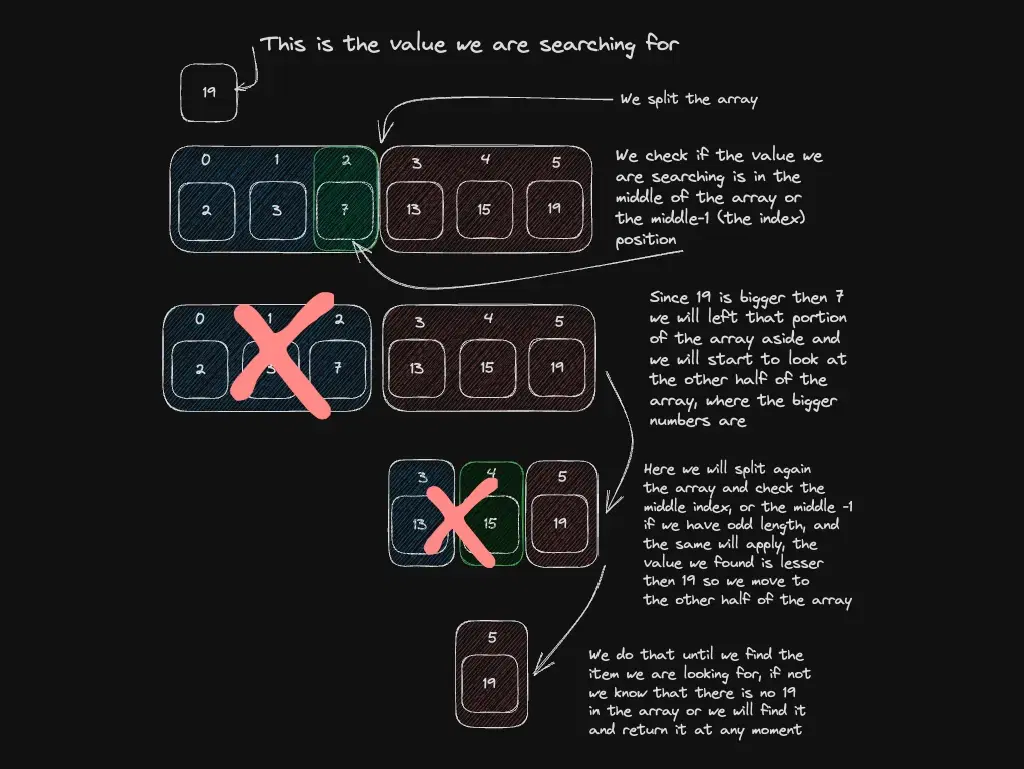
The idea is dead simple: given a sorted array and a target value, check the middle element. If it's the target, done. If the target is smaller, throw away the right half. If larger, throw away the left half. Repeat until found or nothing is left.
scene: en/data-structures-in-a-nutshell/binary-search-steps
Interactive Excalidraw view is not available in this build.
Each step cuts the search space in half. For an array of 1 billion elements, that's at most 30 comparisons to find any value. Compare that to scanning up to 1 billion items linearly—that's O(log n) vs O(n) and the difference is enormous.
Hands-on
First The Theory
Binary search has one hard requirement: the array must be sorted. That's the deal. If the array is unsorted, binary search gives wrong answers silently—it won't crash, it'll just miss things.
The other subtlety is the midpoint calculation. The naive (lo + hi) / 2 can overflow when lo and hi are large integers (this matters more in languages with fixed-size integers like Java or C, but it's a good habit). The safe version is (lo + hi) >>> 1, which uses an unsigned right shift to halve the sum without overflow.
Now The Practice
Create a file called binary-search.js and paste this:
// Iterative — the version you'll use in production
function binarySearch(sorted, target) {
let lo = 0
let hi = sorted.length - 1
while (lo <= hi) {
const mid = (lo + hi) >>> 1
if (sorted[mid] === target) return mid
if (sorted[mid] < target) lo = mid + 1
else hi = mid - 1
}
return -1 // not found
}Breaking it down:
- We start with
loat the beginning andhiat the end of the array. - Each iteration calculates the midpoint
mid. - If
sorted[mid]is our target, return its index immediately. - If the target is larger than
sorted[mid], it must be in the right half—moveloup pastmid. - If the target is smaller, it must be in the left half—move
hidown pastmid. - If
loexceedshi, we've exhausted the search space—return-1.
Now let's add the recursive version too, since it's a common interview question and shows the same logic from a different angle:
// Recursive — elegant, but careful with very large arrays (stack depth)
function binarySearchRecursive(sorted, target, lo = 0, hi = sorted.length - 1) {
if (lo > hi) return -1
const mid = (lo + hi) >>> 1
if (sorted[mid] === target) return mid
if (sorted[mid] < target) return binarySearchRecursive(sorted, target, mid + 1, hi)
return binarySearchRecursive(sorted, target, lo, mid - 1)
}Let's test both. After the functions, add:
const sorted = [1, 3, 5, 7, 9, 11, 13, 17, 21, 25]
console.log('Array:', sorted)
console.log()
// Iterative
console.log('binarySearch(sorted, 7) → index', binarySearch(sorted, 7))
console.log('binarySearch(sorted, 1) → index', binarySearch(sorted, 1))
console.log('binarySearch(sorted, 25) → index', binarySearch(sorted, 25))
console.log('binarySearch(sorted, 6) → index', binarySearch(sorted, 6))
console.log()
// Recursive
console.log('binarySearchRecursive(sorted, 13) → index', binarySearchRecursive(sorted, 13))
console.log('binarySearchRecursive(sorted, 99) → index', binarySearchRecursive(sorted, 99))Run it:
node binary-search.jsExpected output:
Array: [
1, 3, 5, 7, 9,
11, 13, 17, 21, 25
]
binarySearch(sorted, 7) → index 3
binarySearch(sorted, 1) → index 0
binarySearch(sorted, 25) → index 9
binarySearch(sorted, 6) → index -1
binarySearchRecursive(sorted, 13) → index 6
binarySearchRecursive(sorted, 99) → index -1AWESOME!
Both implementations return the correct index for values that exist and -1 for values that don't. Notice that 7 is at index 3—exactly what the diagram at the top traced through.
What if there are duplicate values in the array?
Good catch. Standard binary search finds a matching index, but not necessarily the first or last one. If you need the leftmost or rightmost occurrence, you continue searching after finding a match instead of returning immediately. This is called a lower bound or upper bound search—worth knowing for interviews.
Edge cases: unsorted input and off-by-one
Binary search on unsorted data does not throw — it returns garbage. Sort first or use a Map.
Loop with lo <= hi; update lo = mid + 1 / hi = mid - 1 correctly or you loop forever.
TL;DR — Binary search
| requires | sorted array |
| time | O(log n) |
| git bisect | same idea on commits |
Next steps
Before you go
End of Data Structures in a Nutshell — 16 episodes. Which post helped most? Report any code bug across the series.
Subscribe to the Engineering Ledger
Get architecture and performance notes in your inbox. Same list as the timed prompt—subscribe here anytime.
Related articles

Data Structures and Algorithms - A Summary of The Most Used Ones
Practical overview of the data structures and algorithms you use most in JavaScript/Node.js — with examples and links to go deeper.
Read story
Implementing Arrays with NodeJS and Javascript
JavaScript arrays in Node.js: essential methods, immutability patterns, and when an array beats other structures. Hands-on guide.
Read story