jonathanjuliani
Sorting Arrays with NodeJS and Javascript
Sorting algorithms in JavaScript: bubble, merge, quick, and when to pick each one. Commented code plus complexity in practice.

[10, 2, 1].sort() without a comparator sorts as strings → [1, 10, 2]. Knowing bubble, merge, and quick helps in interviews and when profiling sort-heavy code.
What you'll learn:
- bubble, merge, quick in code
- average vs worst case
- stability
Array.sortcomparators
Prerequisites: arrays (ep. 2).
Sorting algorithms: bubble, merge, and quick
Sorting is one of the most fundamental operations in computer science. You probably use Array.sort() every day without thinking about it—but do you know what it's actually doing? Do you know why sorting a million numbers is fast but sorting a billion is much, much slower? And do you know when the built-in sort will silently give you wrong results?
That's what this post is about. We'll implement a couple of classic sorting algorithms, understand the performance differences, and finish with tips on using JavaScript's native sort correctly.
Hands-on
First The Theory
Before we write any code, let's look at the Big-O picture:
| Algorithm | Best | Average | Worst | Stable? |
|---|---|---|---|---|
| Bubble Sort | O(n) | O(n²) | O(n²) | Yes |
| Merge Sort | O(n log n) | O(n log n) | O(n log n) | Yes |
| Quick Sort | O(n log n) | O(n log n) | O(n²) | No |
| Native sort | O(n log n) | O(n log n) | O(n log n) | Yes (V8 ≥ Node 11) |
A few key concepts:
- Stable sort: if two elements are equal, they keep their original relative order. This matters when you sort objects by one property and want another property to stay in its previous order.
- In-place: the algorithm sorts within the same array without allocating extra memory. Bubble sort and quick sort are in-place; merge sort needs extra space.
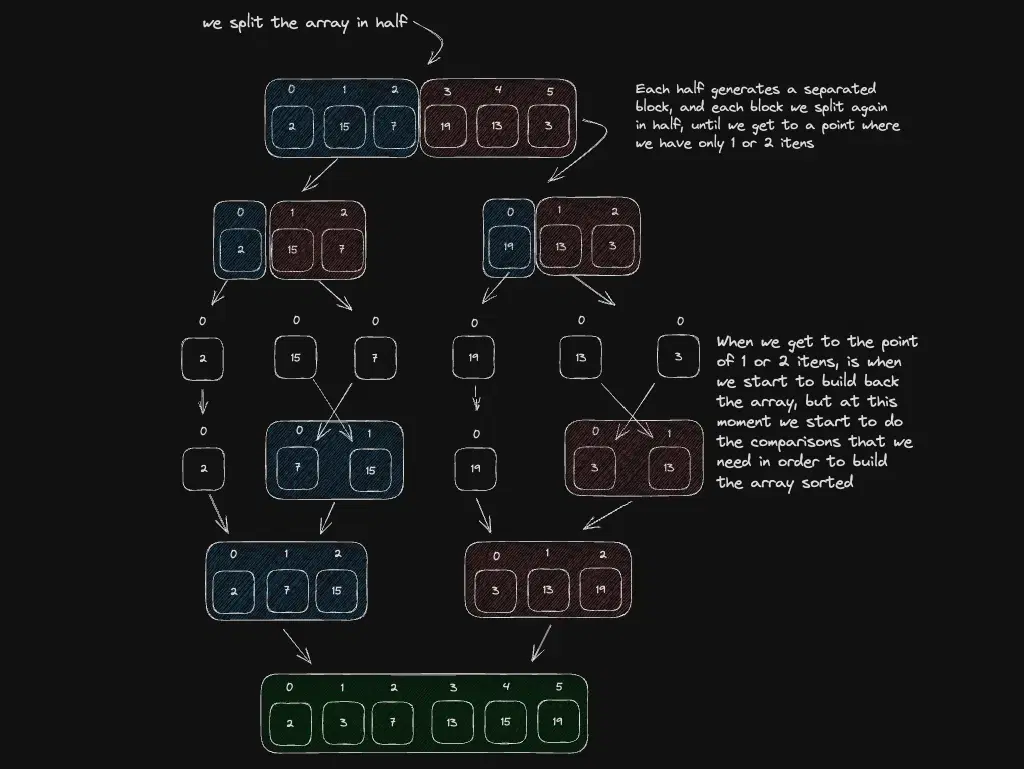
Here's how merge sort splits and merges:
scene: en/data-structures-in-a-nutshell/merge-sort-split-merge
Interactive Excalidraw view is not available in this build.
graph TD A["[38, 27, 43, 3]"] B["[38, 27]"] C["[43, 3]"] D["[38]"] E["[27]"] F["[43]"] G["[3]"] H["[27, 38]"] I["[3, 43]"] J["[3, 27, 38, 43]"] A --> B A --> C B --> D B --> E C --> F C --> G D --> H E --> H F --> I G --> I H --> J I --> J
Split down to single elements (which are trivially sorted), then merge pairs back together—always in order.
Now The Practice
Create a file called sort.js and let's start with the simplest algorithm:
Bubble Sort
function bubbleSort(arr) {
const a = [...arr] // don't mutate the original
const n = a.length
for (let i = 0; i < n - 1; i++) {
let swapped = false
for (let j = 0; j < n - i - 1; j++) {
if (a[j] > a[j + 1]) {
;[a[j], a[j + 1]] = [a[j + 1], a[j]]
swapped = true
}
}
if (!swapped) break // already sorted — best case O(n)
}
return a
}Bubble sort works by repeatedly swapping adjacent elements that are out of order. After each full pass, the largest unsorted element has "bubbled" to its correct position at the end. The swapped flag is an optimisation: if no swaps happened in a full pass, the array is already sorted and we can stop early.
Merge Sort
function mergeSort(arr) {
if (arr.length <= 1) return arr
const mid = Math.floor(arr.length / 2)
const left = mergeSort(arr.slice(0, mid))
const right = mergeSort(arr.slice(mid))
return merge(left, right)
}
function merge(left, right) {
const result = []
let l = 0
let r = 0
while (l < left.length && r < right.length) {
if (left[l] <= right[r]) {
result.push(left[l++])
} else {
result.push(right[r++])
}
}
return result.concat(left.slice(l)).concat(right.slice(r))
}Merge sort is a classic divide-and-conquer algorithm:
- Divide: split the array in half recursively until each piece has one element.
- Conquer: merge pairs of sorted pieces back together, always picking the smaller front element.
It's stable and always O(n log n), but it needs extra memory proportional to the input size.
Native sort
// Lexicographic by default (DON'T use without a comparator for numbers!)
[10, 9, 2, 100].sort() // [10, 100, 2, 9] — WRONG for numbers!
// Correct numeric ascending
[10, 9, 2, 100].sort((a, b) => a - b) // [2, 9, 10, 100]
// Correct numeric descending
[10, 9, 2, 100].sort((a, b) => b - a) // [100, 10, 9, 2]
// Sort objects by a property
const users = [
{ name: 'Charlie', age: 30 },
{ name: 'Alice', age: 25 },
{ name: 'Bob', age: 28 },
]
users.sort((a, b) => a.age - b.age)
// [Alice (25), Bob (28), Charlie (30)]Now let's run a full test. Add this after the functions:
const nums = [38, 27, 43, 3, 9, 82, 10]
console.log('Original:', nums)
console.log('Bubble sort:', bubbleSort(nums))
console.log('Merge sort:', mergeSort(nums))
console.log('Native sort (wrong — lexicographic):', [...nums].sort())
console.log('Native sort (correct — numeric):', [...nums].sort((a, b) => a - b))Run it:
node sort.jsExpected output:
Original: [
38, 27, 43, 3,
9, 82, 10
]
Bubble sort: [
3, 9, 10, 27,
38, 43, 82
]
Merge sort: [
3, 9, 10, 27,
38, 43, 82
]
Native sort (wrong — lexicographic): [
10, 27, 3, 38,
43, 9, 82
]
Native sort (correct — numeric): [
3, 9, 10, 27,
38, 43, 82
]AWESOME!
All three correct implementations produce [3, 9, 10, 27, 38, 43, 82]. And see that "wrong" native sort? That's the classic gotcha—Array.sort converts elements to strings by default, so 10 comes before 3 because "1" < "3" lexicographically. Always pass a comparator when sorting numbers.
Edge cases: comparator and mutation
sort() mutates — clone first: [...arr].sort((a,b) => a - b).
Objects need a comparator returning negative / zero / positive — not boolean.
Numbers need (a, b) => a - b — never rely on default string sort.
TL;DR — Sorting
| algo | typical | use in prod |
|---|---|---|
| bubble | O(n²) | teaching only |
| merge | O(n log n) stable | yes |
| native sort | O(n log n) | yes with comparator |
Next steps
Before you go
Know which algorithm V8 uses for sort? Comment if the post has a mistake.
Subscribe to the Engineering Ledger
Get architecture and performance notes in your inbox. Same list as the timed prompt—subscribe here anytime.
Related articles

Data Structures and Algorithms - A Summary of The Most Used Ones
Practical overview of the data structures and algorithms you use most in JavaScript/Node.js — with examples and links to go deeper.
Read story
Implementing Arrays with NodeJS and Javascript
JavaScript arrays in Node.js: essential methods, immutability patterns, and when an array beats other structures. Hands-on guide.
Read story