NodeJS — Understanding `require`, `exports`, and `module.exports` Once and for All
require, exports, and module.exports in Node.js with examples and common pitfalls. Finally understand CommonJS for real.
Jonathan Juliani
Sr Software Engineer - Full Stack · WithClutch Inc. | Juliani Tecnologia
Node.jsJavaScript
require vs exports vs module.exports: not the same thing
If you write code every day you've probably searched "how to export a function from one JS file to another" at some point, got confused, or just had one of those blank moments that happen when you're juggling multiple files, languages, and projects all day long.
It happens to everyone. A good developer doesn't need to have everything memorised—they need to know where to look and how to apply it. But the web doesn't always give clean answers, and you're left guessing.
Let's fix that for good: there's going to be deliberate errors, live code, and by the end you'll know exactly what Node does when it reads a require.
What you'll learn:
How require() works under the hood — what Node actually does when it hits that line
The real difference between exports, module.exports, and when each one breaks
Why module and exports exist in every .js file without you declaring them — Node's hidden variables
The = assignment gotcha that causes silent bugs in production
The four ways to export — and which one to use
Prerequisites: basic JavaScript and Node.js — functions, objects, and how to run a .js file. I won't cover how to create or run the project from scratch.
Subscribe to the Engineering Ledger
Get architecture and performance notes in your inbox. Same list as the timed prompt—subscribe here anytime.
require(): from node_modules to what your file receives
When you export something from a Node file to use elsewhere, you're creating a module. A module is just a piece of reusable code—like a plugin, or a library package. When you install something with npm and do require('uuid'), you're importing a module.
Here's an example. Let's say we want to use the uuid package:
code
const uuid = require('uuid')
If you open node_modules/uuid/index.js, you'll find a module.exports in there:
code
// ... rest of the codevar uuid = v4module.exports = uuid
That line is telling Node:
"When someone calls require('uuid'), send them the uuid variable."
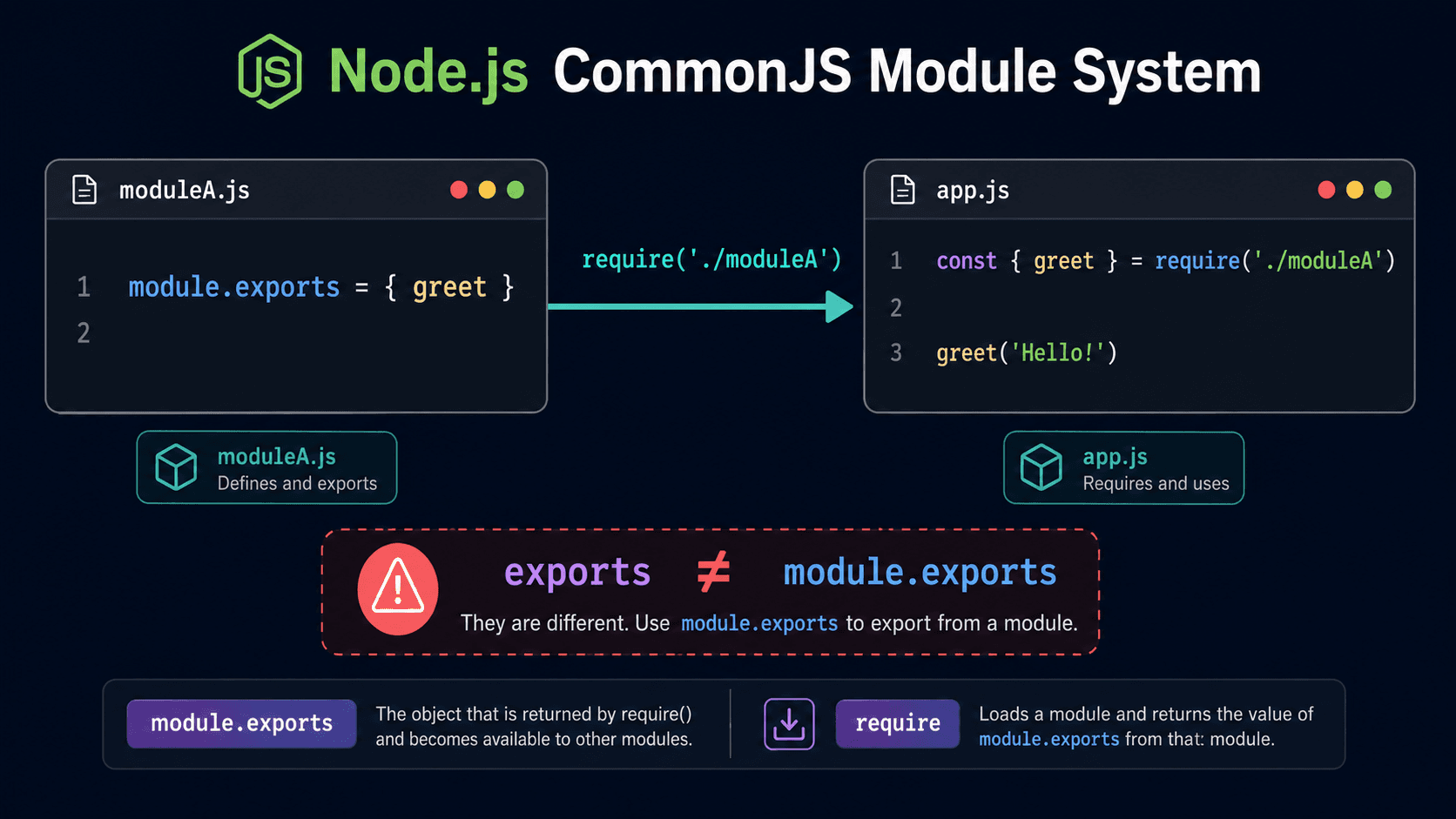
So whenever you call require('something'), Node looks inside 'something' for module.exports and returns whatever is assigned to it.
And in that same uuid example, they're using other requires and exports internally:
code
var v4 = require('./v4')var uuid = v4module.exports = uuid
So when you require uuid, Node returns the value of uuid—which happens to be v4—which is itself a variable loaded from another file with its own require.
In other words: in v4.js there's a module.exports, its value gets assigned to var v4, which then gets assigned to var uuid, and when you call require('uuid') you get the final result of all that—which is the module.exports value from v4.js.
A lot of machinery to pull in one little function... but Node does this so fast you never notice it. And there's a good reason why libraries structure things this way—we'll get to that.
But what's actually inside v4.js? Good question.
code
// ...some code and then:module.exports = v4
So when you do require('uuid') you ultimately get the v4() function.
I get it so far. But why all this indirection just to get a function? Couldn't it all be in the first index.js?
It could. But imagine you have 50 functions in that index.js—that file would be a mess to read and maintain, with a high chance of someone editing the wrong function. So most libraries, projects, and teams split functions into separate files (each with its own responsibility), then re-export them from index.js. That way consumers pick what they need.
Makes sense. So how do I create a module? How do I export something?
Node modules: the hidden variables in every .js file
There are a few ways to do it. But before we get there, we need to understand the module variable. Every time you create a JS file in Node, there's a hidden variable in that file. Can you guess what it's called?
It's called module. That's why you can write module.exports without declaring var module = something—it's already there, hidden.
Check out this code and follow along (create an empty folder so our tests don't conflict with other .js files):
Proving it: module and exports exist without you declaring them
Create a file called hi.js with this content:
code
exports.sayHi = () => { console.log('Hi!')}
Then create an index.js in the same folder:
code
const module = require('./hi')module.sayHi()
Will this print "Hi" to the console? Let's see...
code
> node index.js(function (exports, require, module, __filename, __dirname) { const module = require('./hi')SyntaxError: Identifier 'module' has already been declared
Wait — what?!
Yep. You tried to declare a constant named module, but that identifier is already taken! Let's prove it. Change index.js to:
code
module = require('./hi')module.sayHi()
Run it:
code
> node index.jsHi!
There it is. module really is a hidden variable. When we assigned to it without a const declaration it worked fine, and "Hi!" printed to the console.
Now, you might be thinking: "But in JavaScript you don't need const to create a variable — so aren't you still creating a new module variable?"
Fair point—but no. When we explicitly declared const module, we got a duplicate error, which means module already exists. I'll also show you another hidden variable in a second.
Have you already guessed it? If you thought exports—you're on the right track. Let's see it in action. Replace index.js with:
code
console.log(module)console.log(exports)
Run it:
code
> node index.jsModule { // some linesexports: {}, // other lines}{}
We printed the module object and the exports object! Both exist without us declaring them.
So beyond module, Node also quietly creates an exports variable in every JS file. And it's not just any object—exports points directly to module.exports.
Imagine Node secretly adds this at the top of every file:
So exports starts pointing at the same empty object as module.exports. This is why that hi.js code worked earlier:
code
exports.sayHi = () => { console.log('Hi!')}
We're adding a new attribute called sayHi to the exports object. Since exports === module.exports, that attribute becomes available when you require('./hi').
That's also why you can use exports.X and module.exports.X interchangeably for adding properties. Let's test it properly. Update hi.js:
The = assignment gotcha: when exports and module.exports diverge
The important thing to watch: adding a property with dot notation is safe, but reassigning with = replaces the entire object.
When you do:
code
exports.functionNamemodule.exports.functionName
You're adding a property to the existing object. No problem.
But when you do exports = something, you're replacing the exports variable with a new value, cutting its link to module.exports. The functions you added before exports = ... remain in module.exports, but exports now points somewhere else entirely.
Run index.js (which still calls our three functions). The module print will show all functions intact, but exports will be:
code
> Reassigning exports with =
The functions are still in module.exports. Only the exports shorthand variable was replaced.
Now flip it. Put module.exports = 'Reassigning module.exports with =' at the end of hi.js instead, and try calling the functions from index.js. You'll get an error—because module.exports was replaced with a string, and strings don't have those function properties.
Change index.js to just console.log(require('./hi')) and run again:
code
> node index.jsReassigning module.exports with =
That's the string, not an object with functions. Everything before the module.exports = ... line was wiped out.
Export patterns: the four ways and which one to use
Here's a quick summary of the patterns, from simplest to most common:
Declare functions at the top, export them as an object at the bottom. This is clean, easy to read, and easy to maintain. When you have more complex or larger functions, split them into separate files (like the uuid example) and export/require across files.
When using the object assignment pattern, use module.exports = { ... } and notexports = { ... }. Since you're doing a full reassignment, only module.exports matters—exports just won't apply.
Everyone codes in their own style, and there's no single "right" way. This is just what I use and see most often in real projects. Take it as a reference, not a rule.
TL;DR — require / exports quick reference
Concept
What it is
Gotcha
require('something')
Imports whatever is in module.exports
Always returns module.exports, never bare exports
module.exports
The object the caller receives from require
Assigning with = replaces everything set before
exports.X = ...
Shorthand for module.exports.X = ...
Works fine as long as you don't do exports = X
exports = X
⚠️ Breaks the link to module.exports
Always use module.exports = X for full reassignment
module and exports
Hidden variables Node injects into every .js file
No declaration needed — they're already there
Next steps
Now that you know what's really happening under a require: